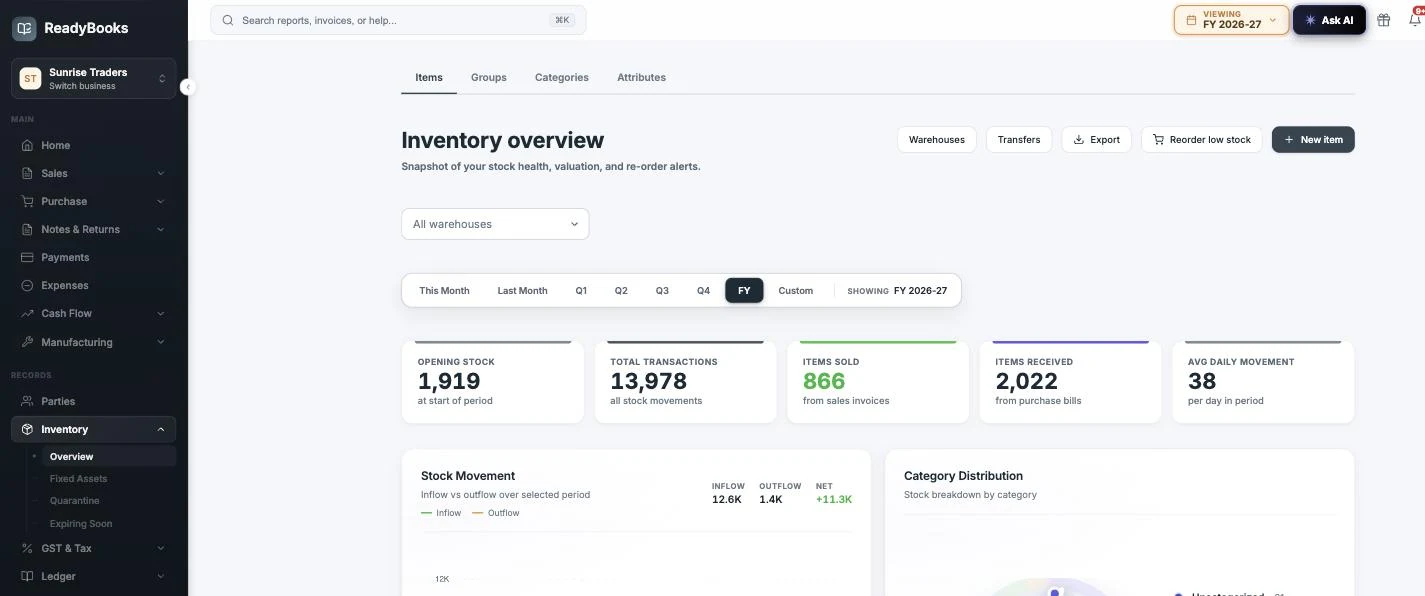
The inventory overview — period KPIs across the top, with inflow-versus-outflow and category-distribution panels below, and warehouses, transfers and the reorder short book one click away.
Stock and accounting in one system
Most stock tools stop at quantities. ReadyBooks treats inventory as an accounting problem: every number traces to a movement, and every movement carries a cost.
Item types, groups and categories in one item master
Everything starts with a single question the form makes you answer once: what is this item?
The item form opens with a four-way selector — Track inventory, Service, Fixed asset, Non-inventory — and only the name is mandatory; SKU, HSN and GST rate can come later. Behind the four kinds sit eight stored item types: an Item role select refines tracked goods into raw material, semi-finished, finished good, packing material or consumable — classification labels you can filter the items list and the Stock Register by, not switches that change behaviour. Only Service and Fixed asset actually change how an item behaves; they are forced non-stock on the server, while the other six carry stock, weighted average cost and ledger postings identically. The HSN/SAC field is a searchable lookup over 22,471 bundled codes: type a code prefix or a description, pick the right one, and it can seed the item name from the code’s official description.
Organisation comes in two independent layers. Item groups are the Tally stock-group analogue — one group per item, optional parent, used to filter the items list and the Stock Register. Categories are richer: an item can carry several, the first one selected is the primary (mirrored onto the item and shown with a PRIMARY badge), new categories can be created inline from the item form, and each category carries an attribute set that decides which attribute inputs appear on items tagged with it. That last part is the point of the taxonomy: categorising an item changes its form.
Two limits worth knowing before you design your tree. Parent categories are organisational only — there is no roll-up of stock or value to a parent, and a child category does not inherit its parent’s attributes; the attribute set you want on an item must be attached to a category the item actually carries. And the items-list category filter matches the primary category only, so the extra category tags show on the item but are not a list filter dimension. If filtering is what you need, make that category the primary.
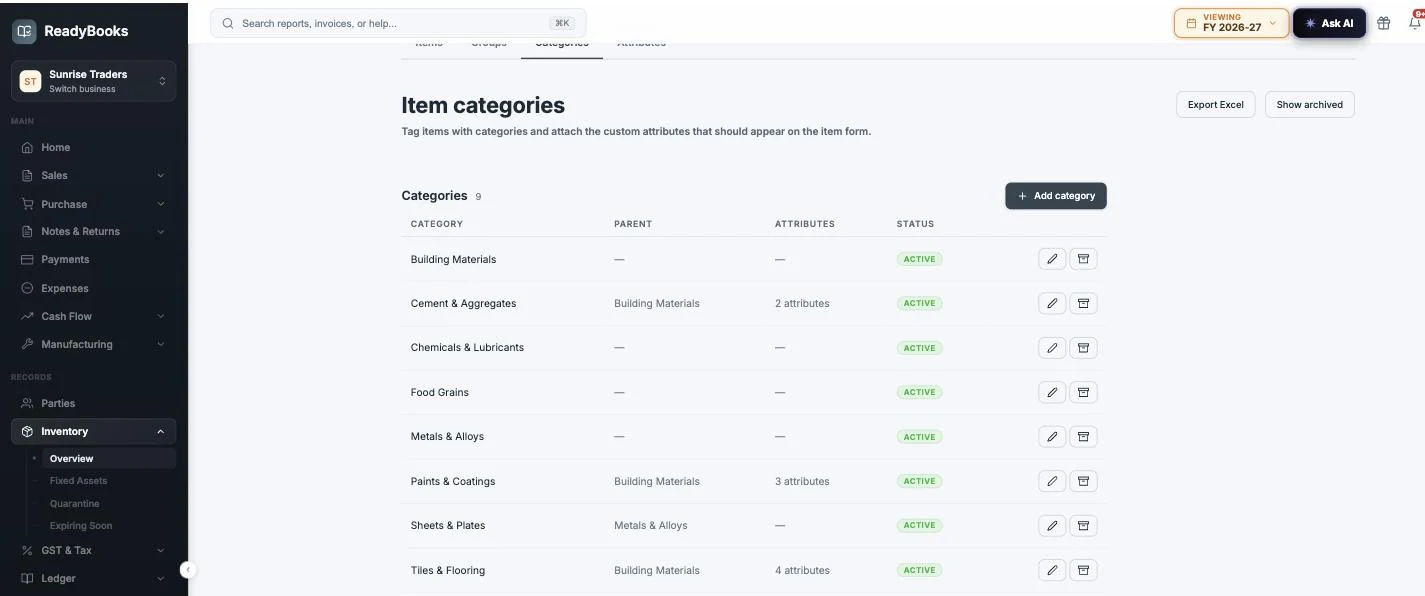
The categories master — parent/child grouping with each category carrying the attribute set that shapes its items’ forms.
Units of measure and per-item pack conversion
The trader’s oldest problem — buy in bags, sell in kilograms — solved at the one point where every downstream number is decided.
ReadyBooks ships a 50-unit catalogue across six categories — count, weight, length, time, volume, area — and lets you add your own units inline (a “Gatta”, a “Peti”) when the trade demands it. An item’s base unit is the unit its stock, cost and every report are kept in. On top of that, the item can carry a secondary pack unit with a conversion factor to its own base unit, stated in whichever direction you know — 1 Bag = 25 KG or 1 KG = 0.04 Bag — with a flip control that inverts the number for you, so the stored factor can never drift from what you meant.
The genuinely valuable part is where the conversion happens. When a line is entered in packs, a single server-side step converts it to base quantity and a per-base rate before tax computation, before the oversell check, before the stock movement, before weighted average cost and before the journal entry. One conversion point means every downstream consumer — GST math, stock, costing, ledger — sees the same base-unit truth. The printed invoice still shows the pack you typed (2 Bags at the per-bag rate, so Qty × Rate foots on the tax invoice), while the e-invoice, e-way bill and GSTR-1 HSN summary file the base quantity with the canonical GSTN unit code, which is what the portal expects.
And the honest boundaries. There is no system-wide conversion table — ReadyBooks does not know that 1 kg is 1,000 g or that 1 m is 100 cm; every factor is defined per item, against that item’s own base unit. The item form manages one alternate unit per item. Pack entry is accepted on sales invoices, purchase bills, delivery challans and POS; quotations, proforma invoices, purchase orders, credit and debit notes and returns take base units only — so an invoice sold in packs is credit-noted in base units. The table below sets out the full boundary.
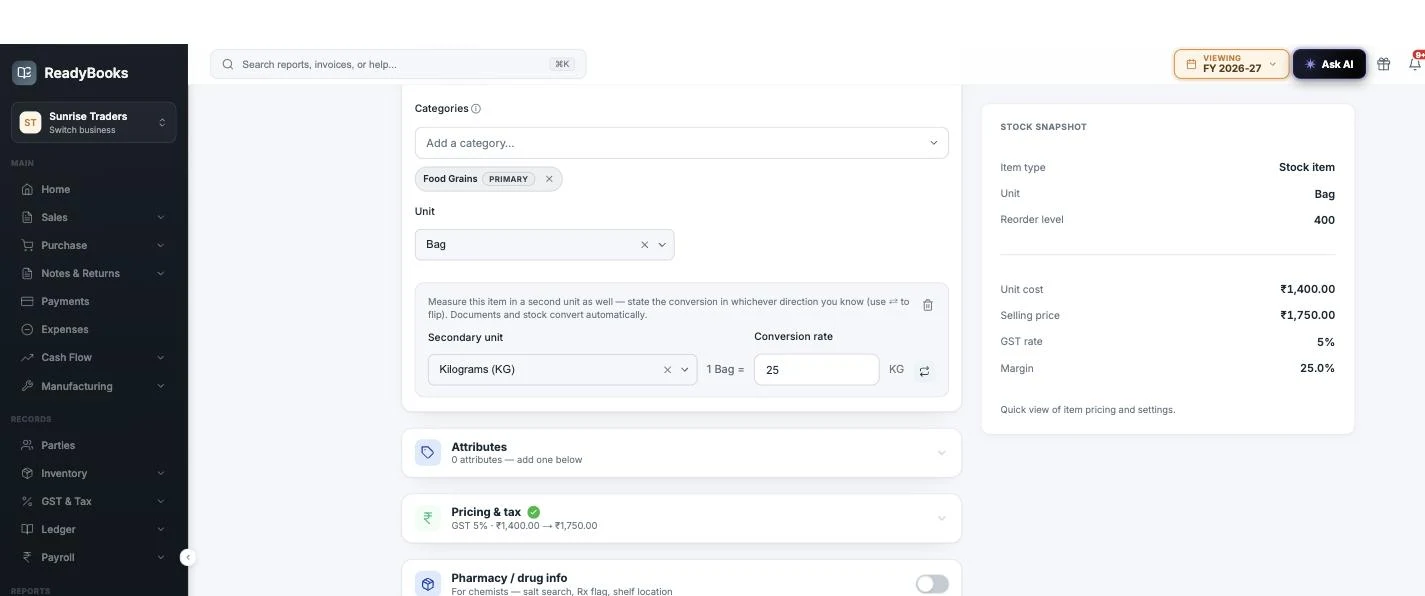
Per-item unit conversion — state the pack in whichever direction you know (1 Bag = 25 KG) and flip it with one click.
Custom item attributes and fields on the item form
Tenant-defined attributes are how a tile trader’s items grow Size and Finish fields while a chemist’s grow Salt and Schedule — without either seeing the other’s clutter.
You define attributes once, as masters: a name plus one of five field types — Text, Number, Date, Dropdown with a managed option list, or Serial No. Two flags change behaviour. “Unique across items” makes the save refuse a value already held by a different item, naming the holder — useful for a model number or a licence code that must never appear twice in the catalogue. “Show on invoices / bills (print)” prints the attribute as a NAME : VALUE line under the item description on document PDFs, which is how Brand or Grade reaches the customer’s copy without polluting the item name.
Attributes attach to categories, and the category attachment is what drives the form: tag an item with “Tiles & Flooring” and the item form renders that category’s attribute inputs; tag it with two categories and it renders the union. One-off attributes can also be added to a single item without touching any category. The masters live under Inventory alongside groups and categories, with dropdown options managed per attribute — options that were used historically are archived rather than deleted, so old documents keep resolving.
Be clear about what the item form captures, because the product itself is: attributes on the item are name tags, and the on-screen copy says exactly where values go — “Values are captured per combination in Variants.” Values are entered per document line when you invoice (informational only — they never touch tax, totals or the ledger) or per variant combination once variant tracking is on; bulk import can additionally write item-level values. One design decision to respect up front: an attribute’s field type cannot be changed after creation, so decide Text versus Dropdown before the data accumulates.
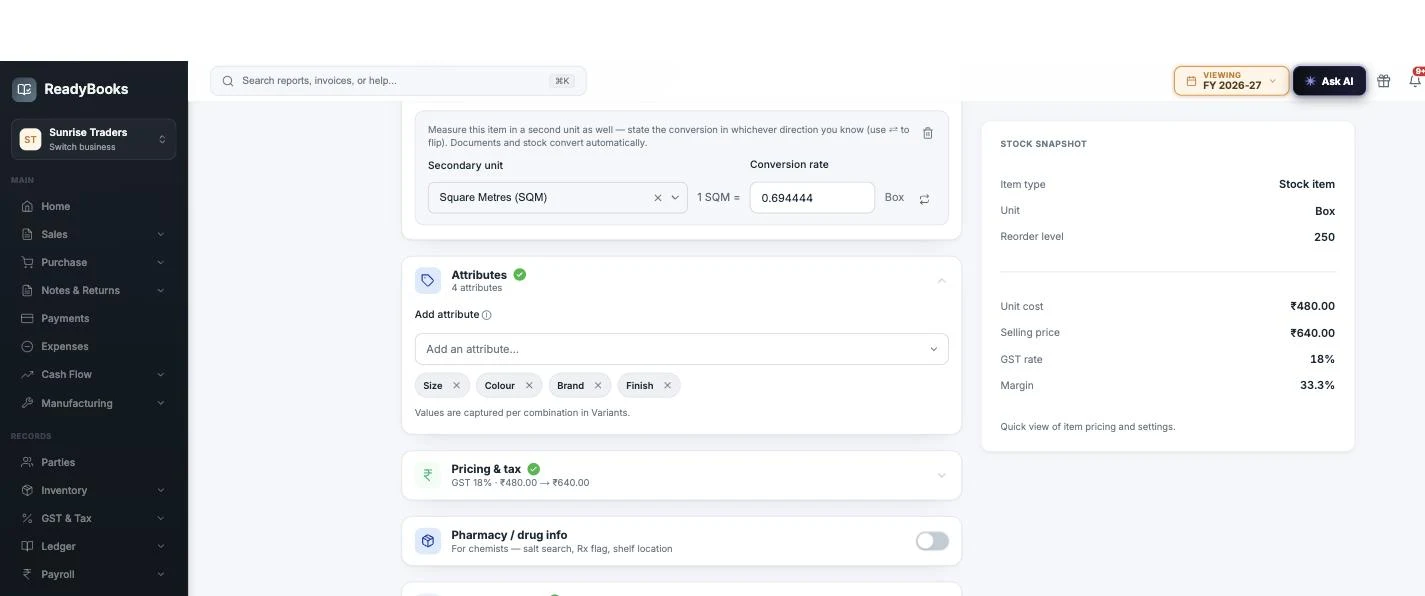
Attributes on the item form are name tags — the product’s own copy says where values live: “Values are captured per combination in Variants.”
Variant stock per attribute combination
Stock per combination — Size × Colour × Brand × Finish — derived from movements, never a counter that can drift.
Switch on “Track attribute variants (per combination)” and every stock movement can carry a combination tag. A variant’s on-hand quantity is the sum of movements stamped with that combination — there is no stored per-variant counter to go stale, which is the failure mode of most variant systems. Combinations come into existence lazily: pick one on an invoice or purchase line and it is created on the spot; combinations are authored on the web item form one at a time (there is no matrix generator, deliberately — a cartesian explosion of combinations nobody stocks is its own data-quality problem).
Real catalogues have history, so untagged stock is a first-class citizen. The “Unspecified” pool is the item’s total minus everything tagged, and it is pickable on documents like any combination — legacy stock stays sellable and can be drained into tagged combinations through variant-tagged adjustments. The register states the invariant on screen, and the screenshot below shows it live: 153 units tagged to combinations plus 194 unspecified equals the item total of 347. If those numbers ever failed to reconcile, that would be a bug, not a rounding note. Archived combinations remain usable for history and drain-down; only new combinations built on archived attributes are refused.
What variants deliberately do not do: change money. Item-level stock, weighted average cost, COGS and journal entries are identical with or without variant tags — tagging never changes a rupee. Variants carry no price, SKU, barcode or reorder level of their own, and the per-combination average purchase rate in the register is display-only. If two sizes genuinely command structurally different prices or costs, model them as separate items; variants answer “which combination is on the shelf?”, not “which combination makes more margin?”.
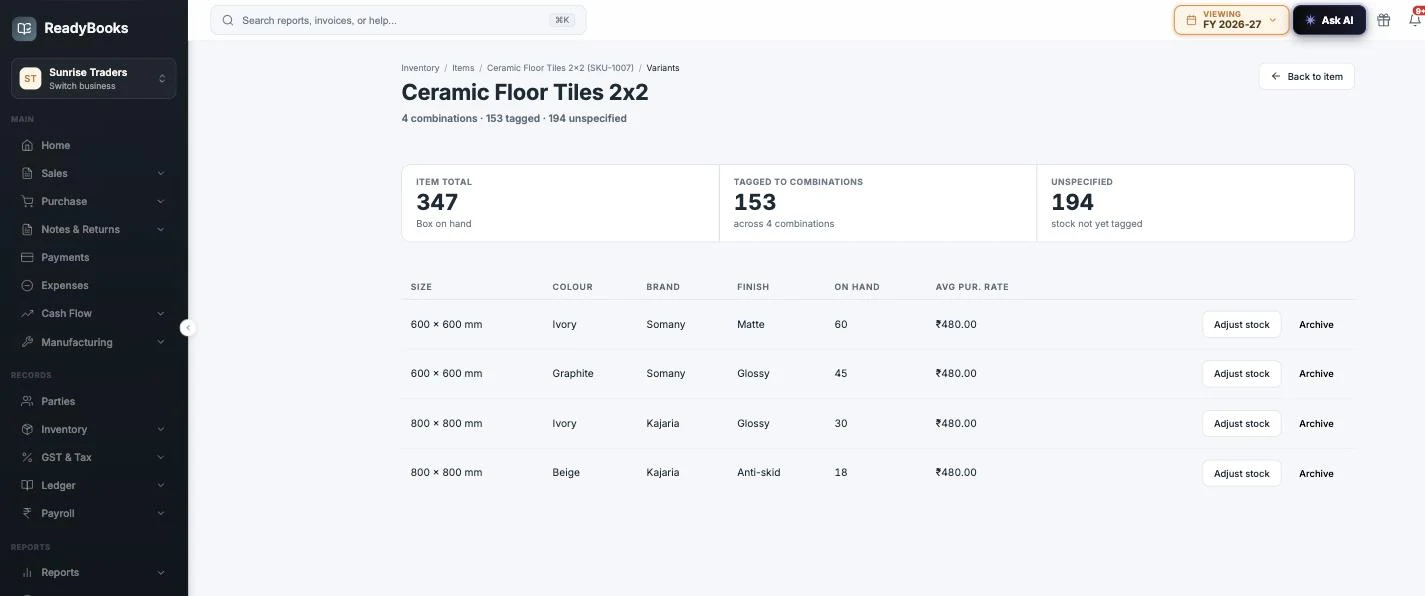
153 tagged + 194 unspecified = 347 on hand — the variant register always reconciles to the item total.
Warehouses, transfers and the movement log behind every number
Multi-location stock, with a movement trail under every figure — and the limits stated as plainly as the features.
Multiple warehouses are a Pro-and-above capability; on the free and entry plans stock lives in a single location. Where it is available, define as many warehouses as your business runs — name, code, address — with one flagged as the default. Per-warehouse stock is derived the same way item stock is: by summing movements per location. Transfers move stock between warehouses as a draft you complete: completion checks the source actually holds the quantity, posts a matched out/in movement pair per line — one pair per lot, for batch-tracked items — at the item’s current weighted average cost so value is conserved, and takes a row lock so two concurrent completions cannot double-post. Alongside your own locations the system maintains special buckets that are excluded from sellable stock automatically: an expired-stock warehouse the nightly sweep relocates lapsed lots into for batch-tracked items, and — on plans that include manufacturing — a quarantine warehouse for stock held back by a goods-receipt QC inspection.
Corrections go through stock adjustments: typed (write-off, physical count, production wastage), reasoned, and run through a draft → approval workflow where small-value adjustments auto-approve under a value threshold and larger ones wait for an admin. Underneath all of it sits the stock movement log: every document that touches stock writes rows recording item, signed quantity, cost, warehouse, batch, variant and the source document. Click any item for a drawer of recent movements with document numbers and party names, or open the Stock Register for per-item opening, inward, outward and closing quantity and value with a running-balance ledger per item — exportable to Excel and a letterhead PDF.
The limits, so you can plan around them. A completed transfer has no line-level detail view and no in-transit stage — stock leaves the source and lands at the destination in the same instant, with no dispatch/receive confirmation (for a GST-documented move between branches, use a delivery challan of type branch transfer, which is a separate printable document). Permissions are module-level, not per warehouse. There are no bin or rack locations inside a warehouse — rack location is a single text field on the item. Stock adjustments post no journal entry, so a write-off needs a manual ledger entry to keep the inventory account in step. And the movement log is re-posted when a source document is edited — it faithfully reflects the current documents, but it is not an append-only audit trail.
How weighted average costing (WAC) works in ReadyBooks
One costing method, applied consistently, with its edge cases documented instead of hidden.
ReadyBooks values stock at weighted average cost — the only method offered, on purpose. WAC is what most Indian SMB auditors expect, and one method applied consistently beats a costing dropdown nobody re-verifies. The average is never nudged in place: after any write that touches stock, the server replays the item’s entire movement history in exact decimals and re-derives the cost, rounding once at the end. Receipts fold in via (stock × WAC + qty × rate) ÷ (stock + qty); outflows never change the average. Sales post COGS from the sale’s own movement costs — the cost at the moment of sale — so a later purchase never restates posted COGS.
What lands in cost is more than the invoice rate. On each purchase bill, header Shipping and the sum of line-level Freight are classified independently: Capitalized amounts are allocated into landed inventory cost, while Expensed amounts stay out of WAC. Both components can coexist; when their positive amounts are equal, ReadyBooks requires you to confirm that they are genuinely distinct costs. Source is independent too: supplier-billed freight is included in that supplier’s payable, while an external carrier cost stays outside supplier due and is linked to the carrier’s Expense. These Shipping and Freight fields are post-tax; taxable supplier freight belongs on a taxable service line. Free scheme quantities enter stock and lower the effective unit cost, the way a trader actually thinks about a 10+1 deal. Cost figures remain behind the dedicated cost-visibility permission, with the Stock Register applying one redaction rule across the screen, the Excel export and the PDF.
Three behaviours to understand rather than discover. First, negative stock rebases cost: if on-hand reaches zero or below, the next receipt resets the average to that receipt’s rate — sell what you have not yet entered and the old cost basis is gone, which is a strong reason to keep entries in order. Second, backdating does not re-cost history: the replay runs in entry order, and a backdated purchase entered today changes the current average without rewriting past movements or reposting old COGS. Third, “valuation” is two numbers, not one: the dashboard tile is on-hand × current WAC (a snapshot at today’s cost), while the Stock Register’s closing value is the sum of actual movement costs (the number that ties to the inventory ledger account) — they can legitimately disagree, and knowing why is half of understanding your own books.
Reorder levels and the low-stock short book
An honest reorder workflow: a standing list you work down, not a notification we do not actually send.
Every item can carry a reorder level (the trigger), a max stock level (the top-up target) and a preferred vendor (who to buy it from). Those three fields drive the low-stock surfaces: the items list filters to low stock, out of stock or negative stock (an item at zero shows under Out of stock, not Low stock); the dashboard’s stock-health card counts in-stock items below their reorder level; and each row shows on-hand, reserved and the reorder level side by side, so the gap is visible at a glance. Reserved stock — quantities allocated to quotations, proformas and production orders — is shown separately from on-hand, so what is already spoken for is visible before you promise it again.
The working tool is the short book. “Reorder low stock” lists every stock-tracked item at or below its reorder level — including items at zero, which a plain low-stock filter excludes — grouped by the vendor to buy from: the item’s preferred vendor, else the vendor on its most recent purchase bill, else an Unassigned group. Each line carries a suggested quantity (the gap up to the max stock level, or up to the reorder level when no target is set) at the item’s current cost, editable before you commit. One click mints one draft purchase order per vendor; you review, adjust and send them like any other PO.
And the part most inventory software fudges: ReadyBooks does not send low-stock notifications. No email, no SMS or WhatsApp, no push, no bell entry, and no scheduled job quietly raising purchase orders overnight. Every low-stock signal in the product renders when someone opens a screen (or asks the AI assistant). We think auto-fired POs and alert fatigue are the wrong defaults for a working purchase desk — but more to the point, we will not describe a pull-based list as an alerting system. One more limit for multi-godown businesses: reorder levels are evaluated against an item’s total stock across all warehouses, not per location.
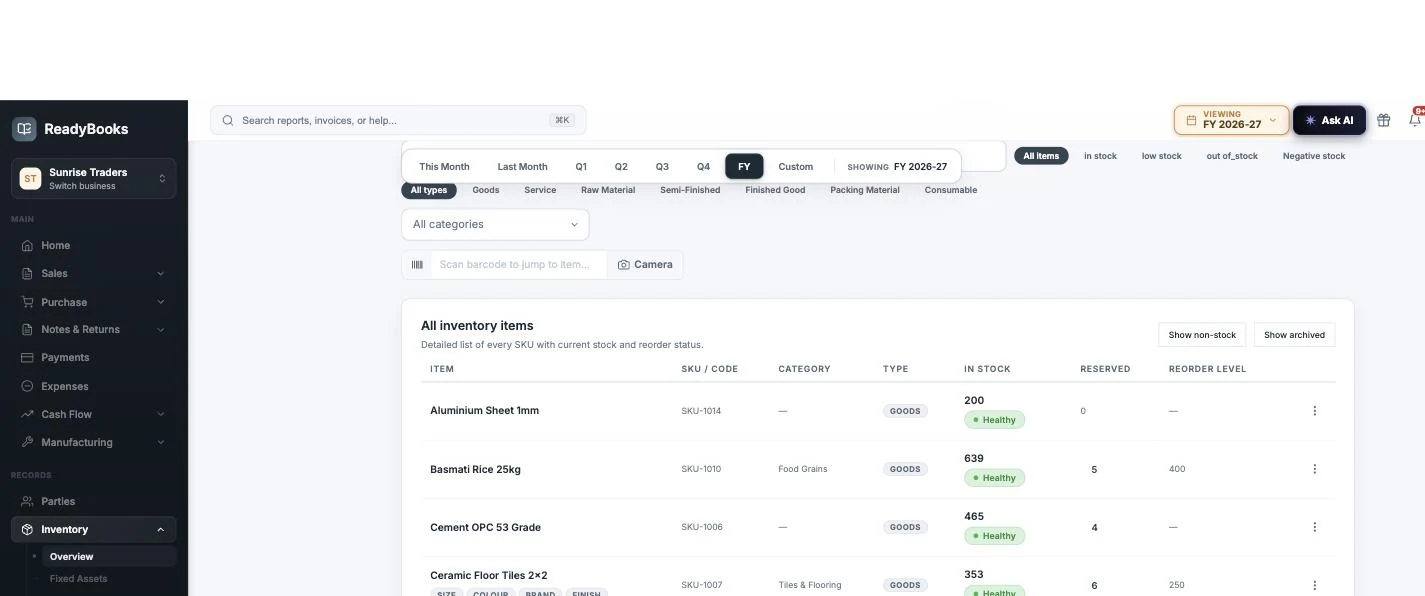
The items list — filter by item role, category or stock status, scan a barcode to jump straight to an item, and see reserved stock and reorder levels per row.
The boundaries, in one place
| Document | Pack-unit entry |
|---|---|
| Sales invoice | Yes — converted to base quantity before tax, stock and ledger |
| Purchase bill | Yes — the entered pack is preserved on the line and the PDF |
| Delivery challan | Yes — stock legs post in base units |
| POS billing | Yes — but a per-line discount is not allowed on a pack line |
| Quotation / proforma invoice | No — enter base units |
| Purchase order | No — enter base units |
| Credit / debit note, sales return | No — returns are entered in base units |
| GST filings (e-invoice, e-way bill, GSTR-1) | Always base quantity with the canonical GSTN unit code |
| Field type | What it stores | Worth knowing |
|---|---|---|
| Text | Free text up to 500 characters | Prints as NAME : VALUE when print-flagged |
| Number | A decimal value (4 places) | Non-numeric input is rejected at save |
| Date | A calendar date (YYYY-MM-DD) | Validated as a real date |
| Dropdown | One value from a managed option list | Up to 500 options; removed options archive rather than delete |
| Serial No | Free text in a serial format | A label format only — separate from serial-number stock tracking |
More of the module, as it actually looks
Captured from a live ReadyBooks tenant — the masters and tracking screens the deep dives above describe.
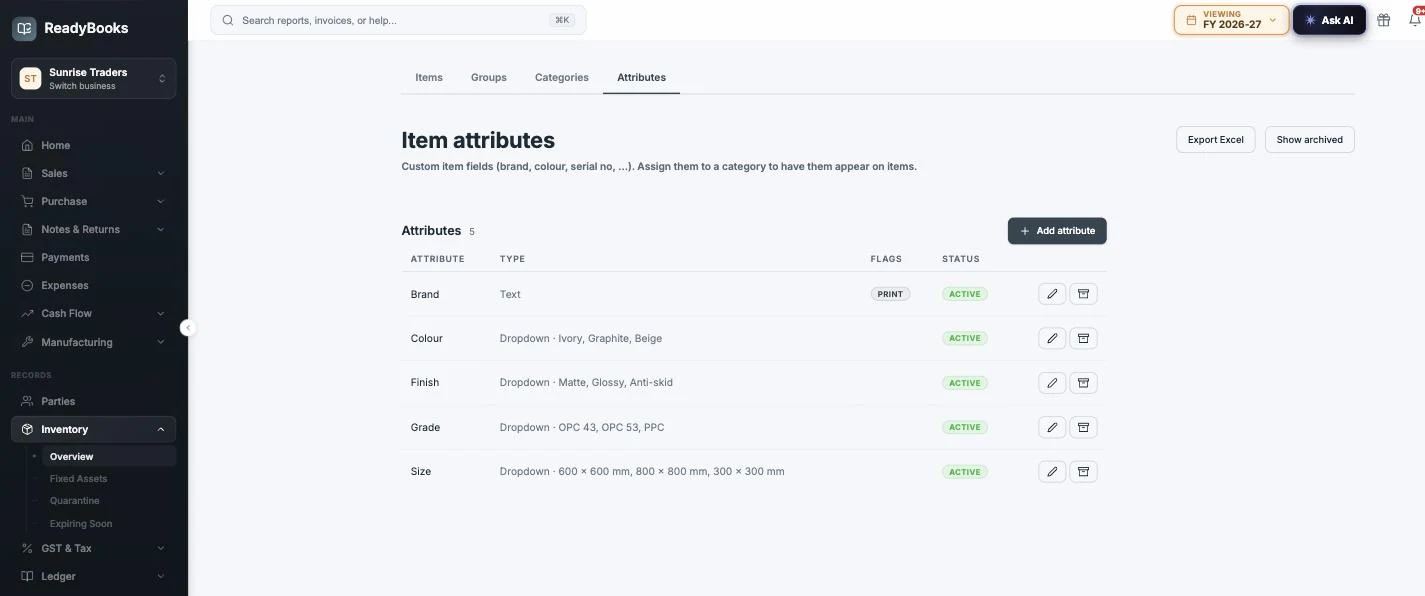
The attributes master — each attribute’s field type and, for dropdowns, its option list; Brand carries the Print flag so its value prints on documents.
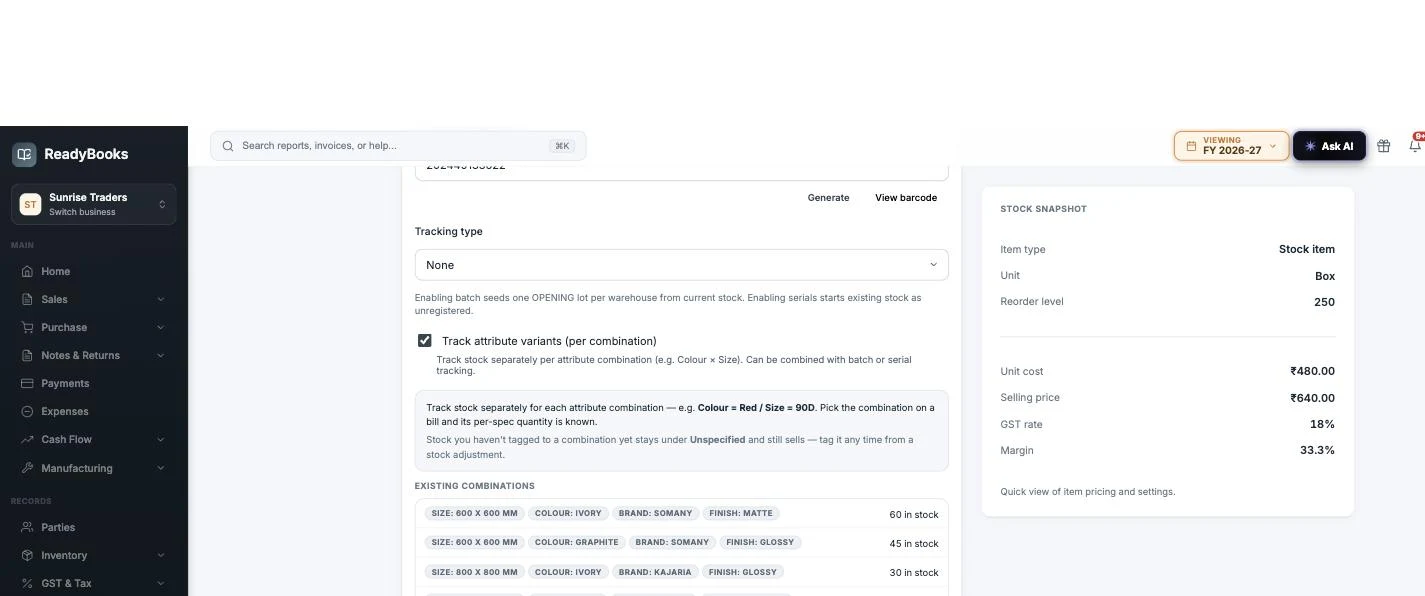
Stock & tracking — barcode, tracking type and the per-combination variant toggle, with existing combinations and their stock shown inline.