Live AI Engine Active
EXPENSE MANAGEMENT

Expense management software for Indian businesses

Capture every business expense with its amount, category, and date, attach the receipt, and schedule the costs that repeat — all inside the same system that keeps your books, so spending lands in your profit and loss instead of a separate app you reconcile later.
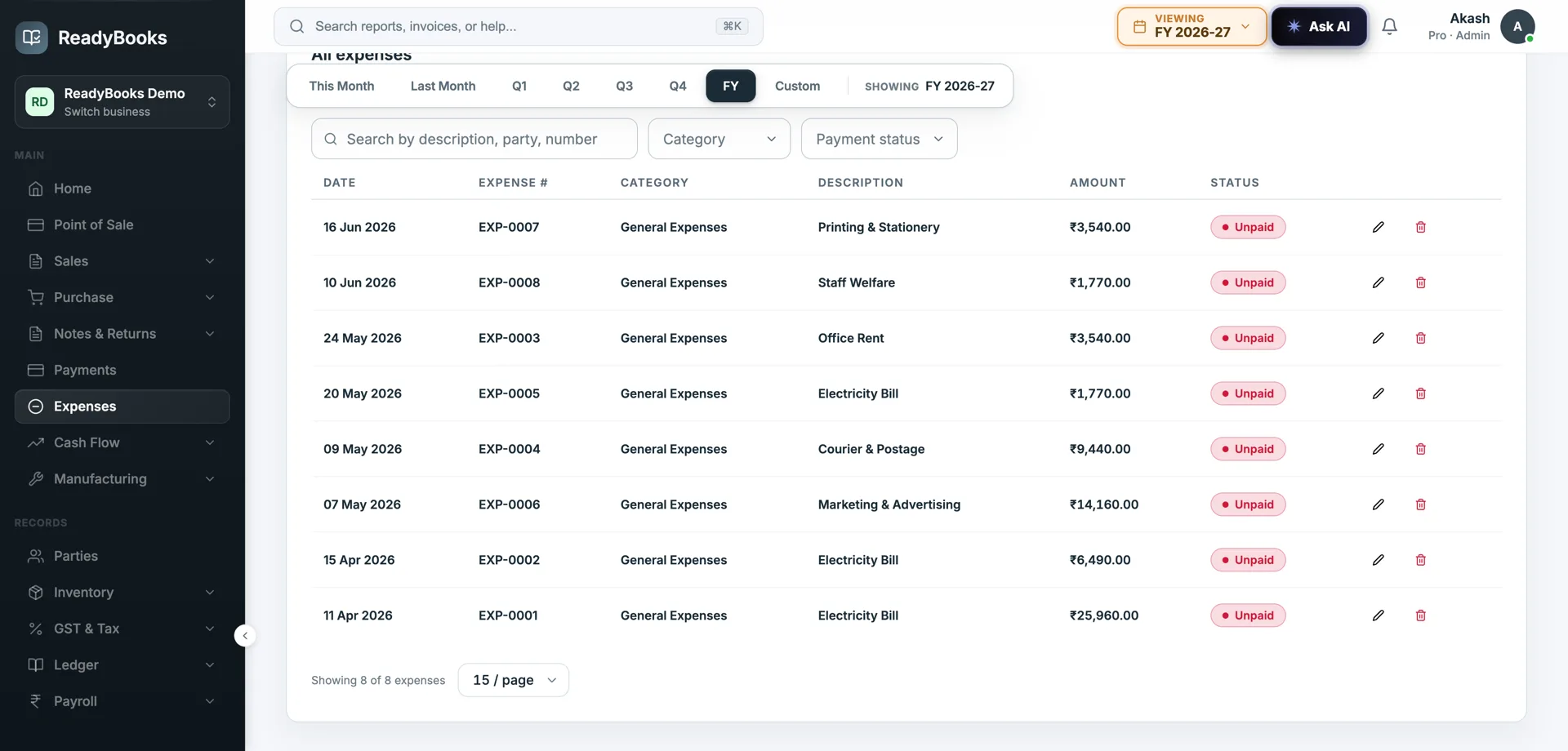
ReadyBooks expense management screen with categorised expenses and totals

Expenses captured by category with recurring costs — spending that sits on the books.

Spending, captured and on the books

Record it, categorise it, attach the proof, and let it flow into the same accounts as everything else.

Categorised expense capture

Record an expense with its amount, category, and date so spending is organised by type from the moment it is entered. Categorisation is what turns a list of payments into something you can analyse — where the money went, by head.

Receipt attachments

Attach the receipt to the expense so the proof of spend lives with the entry. When you, your accountant, or an auditor review expenses later, the supporting document is right there — not lost in a drawer or buried in email.

Recurring expenses

Set up predictable, repeating costs — rent, utilities, subscriptions — as recurring expenses so they are scheduled rather than re-keyed every month. Regular outgoings stay on the books consistently instead of depending on memory.

On the books, not in a silo

A recorded expense is part of your accounts — it affects your profit and loss and your financials — because ReadyBooks is a full accounting system, not a standalone expense app whose data never reaches the ledger.

Spending by category

With expenses categorised and dated, see where the money goes by head of cost. The categorisation is the basis for understanding and controlling spending rather than just totalling it.

Reporting over time

Expense data feeds the same reporting that covers the rest of your finances, so you track cost by category and across periods alongside revenue, cash, and the rest of the picture — one source, not a spreadsheet bolted on.

Why businesses track expenses in ReadyBooks

Because expenses that live in a separate app are expenses that never quite make it into the real numbers.

Every expense lands in the books

Spending recorded here is part of your accounts and your P&L immediately — no monthly chore of copying an expense app’s totals into the ledger and hoping they reconcile.

Proof attached to the entry

Receipts live on the expense record, so review and audit are a matter of opening the entry, not hunting for paper. The support and the figure stay together.

Regular costs on autopilot

Recurring expenses keep rent, utilities, and subscriptions on the books every period without re-entry, so your cost base is complete rather than missing whatever someone forgot to key.

Cost you can actually see

Category and date on every expense turn spending into analysis — where cost is going and how it moves over time — feeding the same reporting as the rest of your finances.

Expenses belong in your accounts

Plenty of businesses track expenses in a separate app or a spreadsheet, and it feels organised until month-end. Then someone has to take those totals and get them into the actual books, the receipts are in a different place from the figures, and the recurring costs that nobody re-entered are simply missing. The expense record and the accounting record are two things that are supposed to agree and rarely do.

ReadyBooks treats expenses as what they are: part of your accounts. You capture an expense with its amount, category, and date, attach the receipt to the entry so the proof stays with the figure, and — because ReadyBooks is a full accounting system — that expense immediately affects your profit and loss and your financials. There is no second step to push it into the ledger, because it was never outside the ledger to begin with.

The categories and dates do double duty. They keep your books correct, and they make spending analysable: cost by head, cost over time, sitting in the same reporting as revenue and cash. Recurring expenses keep predictable costs like rent and subscriptions on the books every period without re-keying. For AI-assisted bill capture from a photo, ReadyBooks offers that through its AI assistant and bill-extraction workflow — we point you there rather than overstate what the expense screen itself does, because honest scope is part of trusting the numbers.

How recurring expenses keep your P&L complete

The costs that quietly distort a profit figure are the ones nobody remembers to enter. Recurring expenses close that gap.

Rent, utilities, software subscriptions, retainers — these repeat every month and they are exactly the costs most likely to be missed when expense entry depends on someone remembering. A month where the rent is not keyed looks artificially profitable, and the error is invisible until a later reconciliation forces a correction into the wrong period. Setting these up as recurring expenses means the schedule carries them, not a person’s memory, so each period’s cost base is complete.

Because a recorded expense in ReadyBooks is part of the accounts rather than a note in a separate app, a recurring expense lands in your profit and loss as it falls due, against the category you chose. The consequence is a P&L you can trust between formal closes: the predictable costs are always present, categorised, and dated, so the margin you read mid-month is not flattered by a missing rent line. That is the difference between an expense log and expense accounting.

Where expense tracking fits

Three Indian businesses getting spending onto the books.

Agency, GurugramExpenses tracked in a spreadsheet, receipts in email, and a painful month-end copying totals into the accounts.

Expenses are captured with category and date and receipts attached to each entry, and because they are already in the books there is no month-end copy step — the spreadsheet and the reconciliation disappear.

Retail chain, LucknowRent and utility bills across outlets get missed some months because nobody re-enters them.

Recurring expenses schedule the rent and utilities so they stay on the books every period automatically, and category reporting shows cost by head across the outlets over time.

Consultancy, BengaluruWants to see where money goes by category, but the expense app does not connect to the financials.

Categorised, dated expenses feed the same reporting as the rest of the finances, so spending by head and over time sits alongside revenue and cash in one consistent picture.

Frequently asked questions

Get your spending onto the books

Capture expenses with categories and receipts, schedule the costs that repeat, and see spending in the same reports as the rest of your finances. Start free. No credit card required.

Chat on WhatsApp